Editorial command centre
Assignments, drafts, editing, approvals and publication status — in one organised workflow.
 CALIBREX
A newsroom management system for media businesses that coordinate editorial production and publishing. Less fragmentation, clear ownership, review and approval you can see, and the state of the work in progress, from the independent journalist to the 24×7 network.
An independent journalist has to verify the facts, write the story, prepare a Bengali version, cut a short video and publish everywhere — before anyone else. Here is how that morning runs on NRCS.
A source messages about a breaking development. The story is opened in NRCS — draft, source notes and photos in one workspace.
The facts are checked and the copy is tightened. The story moves from Draft to Approved — no lost versions, no guessing.
A second-language edition sits alongside the original, with its own status — so nothing goes out of sync.
The verified story becomes a video script, a social post and a newsletter item — all organised from the same story.
Web, video and social go out from one structured workflow — and the story joins a searchable archive for tomorrow.
One story through NRCS, every step labelled honestly.
The desk assigns the story with an owner, a deadline and a section.
Reporters write and attach documents, photographs, video and scripts.
Editors work on the story; every hand-off is visible.
Review and sign-off before anything goes out.
The rundown shows every story by section, priority and stage.
Publishing to your channels, integrations and reporting, depending on your setup.
Available today shown in the product’s real screens · Needs configuration depends on your setup and is confirmed in your demo · Planned on the roadmap, not yet available. Nothing on this page is planned-only.
The newsroom’s operational command centre — not just another content management system.
Assignments, drafts, editing, approvals and publication status — in one organised workflow.
Coordinate web, social, video and language versions of every story.
Documents, photographs, video, graphics and scripts — where the right people can find them.
Clear ownership, deadlines, review responsibilities and hand-offs.
See the state of the pipeline, the bottlenecks and the output at a glance.
Integrations, automated publishing and reporting depend on your setup. We’ll show you exactly what is available in your walkthrough.
The rundown, the ops board, the analytics — real screens from the newsroom system.
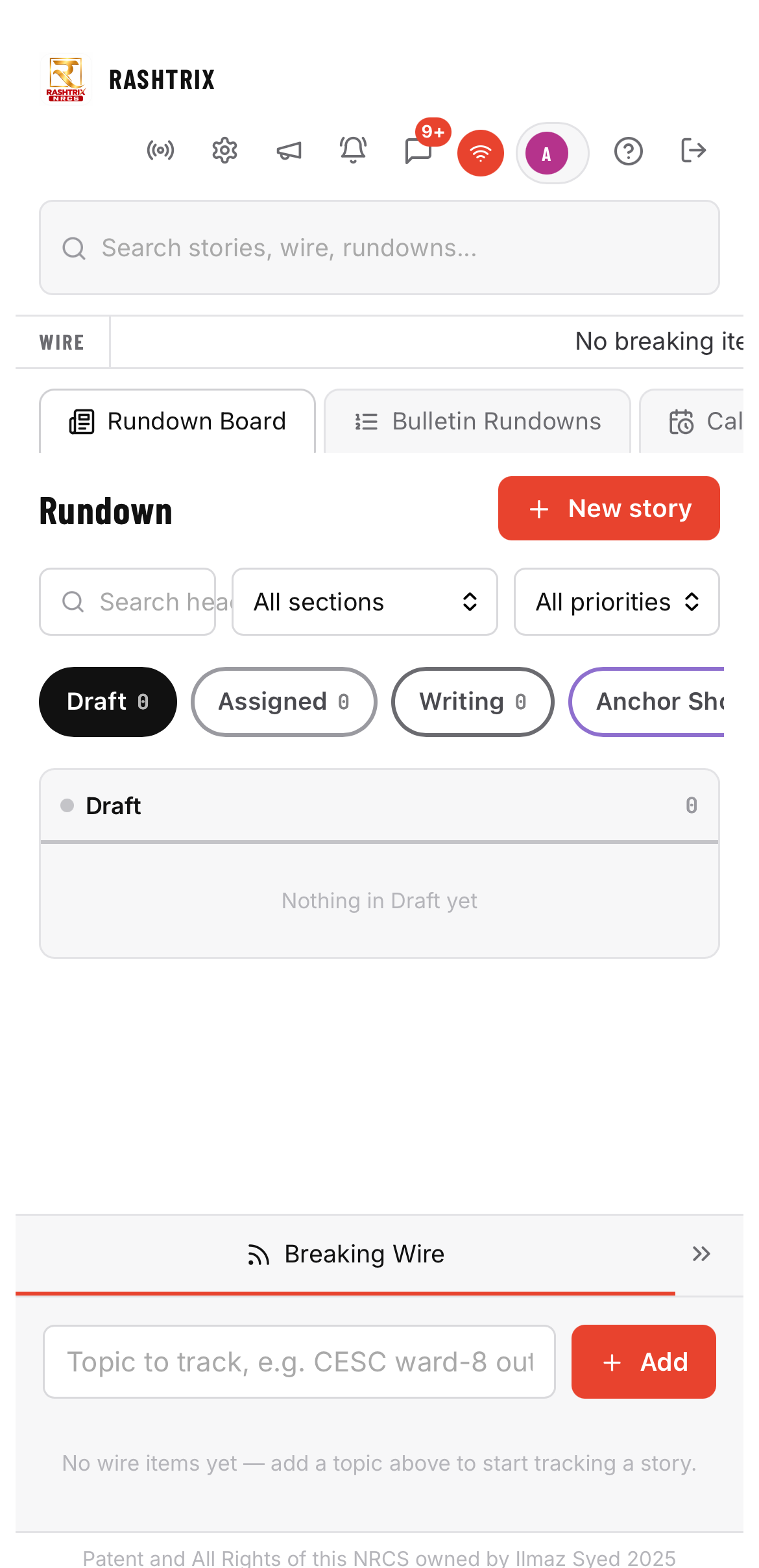
A rundown board for stories by section, priority and stage — from draft to on air.
See it with your own newsroom’s workflow in a 30-minute walkthrough.
About 30 minutes. Bring the people who run your desk.
The independent journalist buys freedom. The newsroom buys coordination. The media owner buys operational leverage. Step inside yours.
A breaking tip arrives in Kolkata at dawn. You have to verify it, write it, prepare a Bengali version, cut a short video and publish everywhere — before anyone else. Alone.
Choose a world to enter it →Integrations, automated publishing and reporting depend on your setup. We’ll show you exactly what is available in your walkthrough.
Integrations, automated publishing and reporting depend on your setup. We’ll show you exactly what is available in your walkthrough.
Monthly, in Indian rupees. Every plan, Enterprise included, comes with the OSINT Studio Starter plan at no extra cost.
| Plan | Per month | For | What’s included |
|---|---|---|---|
| Solo | ₹25,000 | Independent journalists and solo publishers | Essential editorial workflow; limited NRCS features and newsroom tools |
| Professional | ₹75,000 | Print and digital publishing teams | Print and publishing workflows, storyboard management, editorial rundown |
| Print + VOD | ₹1,50,000 | Newsrooms publishing in print and video | Everything in Professional, plus video-on-demand workflows and integrated print and video publishing |
| Print + VOD + Live | ₹2,30,000 | Newsrooms adding live production | Everything in Print + VOD, plus live production and multiformat operations |
| 24×7 Newsroom | ₹3,40,000 | Round-the-clock news operations | Print, VOD and live, plus 24×7 live operations and newsroom management |
| Enterprise | Custom | Large organisations | Everything in 24×7, plus HRMS, custom integrations and tailored deployment |
A limited-feature free demo is available. Implementation, custom integrations and Enterprise deployments are quoted separately. Taxes as applicable. Explore the capability ladder →
The Calibrex OSINT Academy trains reporters and editors in sourcing, verification and briefing, with Field Missions built for newsrooms: The Studio of One, The Control Room and The Glass Tower.
A newsroom management system: assignments, drafts, editing, approvals, rundowns, multimedia organisation and publication status in one workflow, across platforms and language versions.
Independent journalists, digital newsrooms and media businesses, from a single publisher to a 24×7 operation.
Solo ₹25,000 a month; Professional — Print & Publishing ₹75,000; Print + VOD ₹1,50,000; Print + VOD + Live ₹2,30,000; 24×7 Newsroom ₹3,40,000; Enterprise is custom. Every plan includes the OSINT Studio Starter plan.
Integrations, automated publishing and reporting depend on your setup. We confirm exactly what is available for you in the walkthrough, and quote implementation separately.
Yes, a limited-feature free demo of NRCS is available. Full capabilities come with paid plans.
A walkthrough with your workflow, a requirements assessment and the plan that fits, an implementation scope agreed in writing, then guided onboarding for your team.
Every newsroom is different. Book a guided walkthrough: we’ll map your workflow, the plan that fits and what onboarding involves.
Tell us who you are and what you need to get done. We’ll walk you through the product with your own use case — and tell you plainly what is available today.
Open the app in Safari → Share → Add to Home Screen.
Open in Chrome → Install app or Add to Home screen.
Open in a supported browser → select the install icon or use the browser menu.